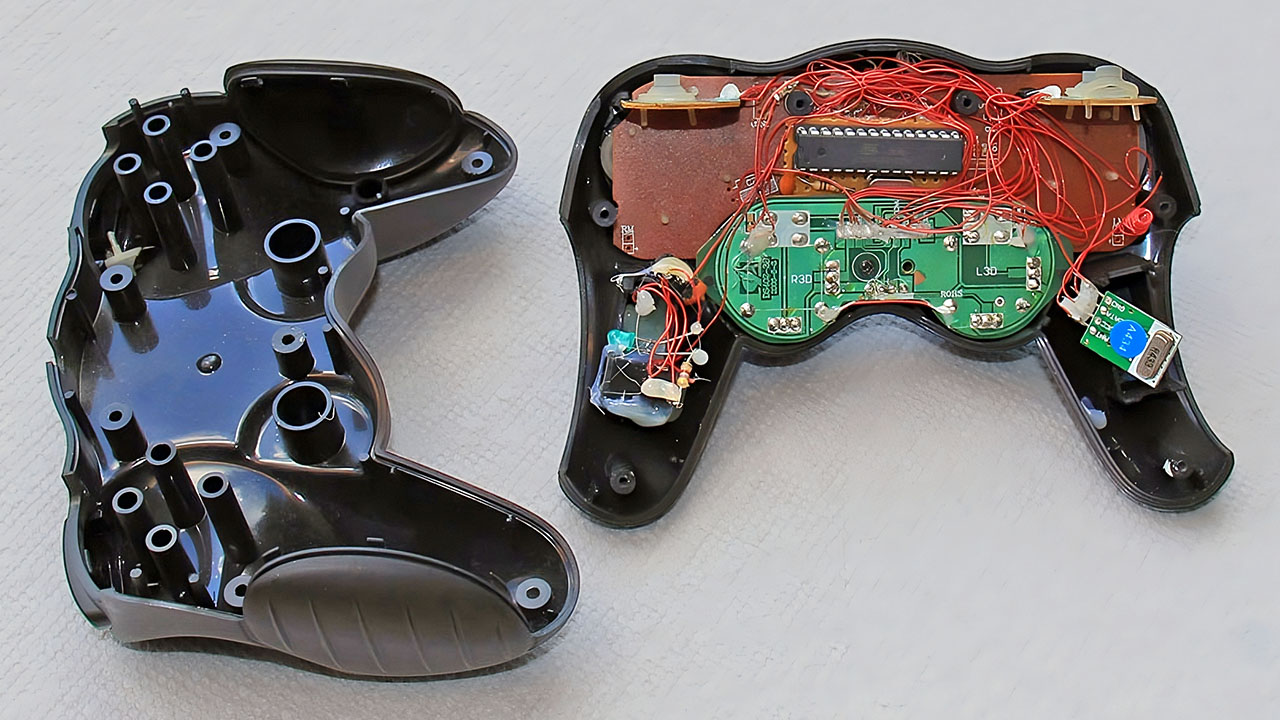
I was thinking about designing a wireless joypad to control my robot, and I finally came up with an idea to repurpose a cheap Gigaware PS2 Joypad from RadioShack, which cost only $9.99. This joypad includes:
- 2 Joysticks
- 1 8-way D-Pad (Direction Pad)
- 8 Action Buttons
- 4 Extra Buttons (Select, Start, Macro, Mode)
I began by searching the web for ways to interface this PS2 controller with an Arduino and discovered an Arduino-compatible library called the PSX Library. Unfortunately, it didn’t work with my setup, likely because the library was designed for PlayStation 1 controllers, whereas mine was PS2-compatible. So, I decided to create my own library instead.
We developed the sperm into a clinging clot, then the clot into a lump, then the lump into bones, then clothed the bones with flesh, then We brought it into being as a new creation. So Blessed is Allah, the Best of Creators.
Quran 23:13-14

First, I removed the PS2 connector and the long cable, as this project would be wireless. I didn’t need any of the internal circuitry of the joypad, just the push buttons, LEDs, and joystick potentiometers. I figured out the schematic of the two joysticks:

The approximate value for each potentiometer is 5.2K ohms. These four points would serve as the Arduino’s analog inputs (Pins 1 to 4). Due to the limited space inside the joypad, I used wire wrap wires to solder the connectors for the buttons, potentiometers, and LEDs. I managed to solder only 8 out of the 16 buttons because the others were too compact to handle. These 8 buttons and 2 LEDs would connect to 10 digital I/O pins on the Arduino.
Here is the picture of the modified joypad:

And here are the Arduino, and the RF transmitter and receiver modules:

I found a few reference articles on interfacing RF modules with microcontrollers:
- Running TX433 and RX433 RF Modules with AVR Microcontrollers
- KLP/KLPA Module Walkthrough by Sparkfun
- Implementing RF Modules
I followed the first reference, and it worked without any issues. The example module used a 4-byte packet transmission protocol at 1200 bps, but I modified the code for the Arduino to work at 2400 bps since my RF modules were a bit faster, capable of 4800 bps.
Each joystick on my joypad has two axes (X and Y), giving 4 analog inputs to the microcontroller. Each input has a resolution of 1024 (0 to 1023), requiring 2 bytes (integer) for each. Therefore, 2 joysticks need 8 bytes (4 x 2 bytes). The 8 push buttons can be represented with 1 byte (1 bit per button). The data transmission packet also includes 1 synchronization byte, 1 address byte, and 1 checksum word (2 bytes), making the complete packet length 13 bytes (8 + 1 + 1 + 1 + 2).

I kept the code clean and well-commented. Since there are two separate circuits, the transmitter (joypad itself) and the receiver (Arduino Duemilanove), I wrote two separate scripts. However, I made the WirelessDataPacket class common for both.
Below is the source code for the transmitter module:
#include <stdio.h>

int r_sync = 0xAA;  // synchro signal
int r_addr = 0x44;  // receiver address

char buffer[36];

// pin configuration between arduino and joypad
int pinLeftStickX  = 1;  // Analog Pin 1
int pinLeftStickY  = 2;  // Analog Pin 2
int pinRightStickX = 3;  // Analog Pin 3
int pinRightStickY = 4;  // Analog Pin 4

int pinButtonL1 = 9;     // L1 Button
int pinButtonL2 = 10;    // L2 Button
int pinButtonR1 = 11;    // R1 Button
int pinButtonR2 = 12;    // R2 Button

int pinButtonSelect = 8; // select button
int pinButtonStart = 5;  // start button
int pinButtonMacro = 7;  // macro button
int pinButtonMode = 6;   // mode button

int pinLEDRed = 2;       // red LED pin
int pinLEDYellow = 4;    // yellow LED pin

int releasedButtonMacro = true; // either the macro button is pressed(false) or released(true)
int releasedButtonMode = true;  // either the mode button is pressed(false) or released(true)

// status
boolean macro = false;
boolean mode  = false;

//-----------------------------
// multiple bytes manipulation
//-----------------------------
int getHiByte(int intData) {
  return (intData >> 8);
}

int getLoByte(int intData) {
  return (intData & 0xFF);
}

int mergeHiLo(int hi, int lo) {
  return ( (hi << 8) | lo );
}

//----------------------------------
// Each data packet has 4 bytes:
// sync | address | data | checksum
//----------------------------------
class WirelessDataPacket {
  public:
  int address;
  int leftStickX;
  int leftStickY;
  int rightStickX;
  int rightStickY;
  int button;
  int checksum;

  WirelessDataPacket(int addr) {
    address = addr;
  }

  int sendPacket() {
    checksum = address + leftStickX + leftStickY + rightStickX + rightStickY + button;

    Serial.print(r_sync, BYTE);                  // send sync byte
    Serial.print(address, BYTE);                 // send address byte
    Serial.print(getLoByte(leftStickX), BYTE);   // send leftStickX Low Byte
    Serial.print(getHiByte(leftStickX), BYTE);   // send leftStickX High Byte
    Serial.print(getLoByte(leftStickY), BYTE);   // send leftStickY Low Byte
    Serial.print(getHiByte(leftStickY), BYTE);   // send leftStickY High Byte
    Serial.print(getLoByte(rightStickX), BYTE);  // send rightStickX Low Byte
    Serial.print(getHiByte(rightStickX), BYTE);  // send rightStickX High Byte
    Serial.print(getLoByte(rightStickY), BYTE);  // send rightStickY Low Byte
    Serial.print(getHiByte(rightStickY), BYTE);  // send rightStickY High Byte
    Serial.print(button, BYTE);                  // send button byte
    Serial.print(getLoByte(checksum), BYTE);     // send checksum byte
    Serial.print(getHiByte(checksum), BYTE);     // send checksum byte

    return 0;
  }

  // wait until a new byte (8 bit) arrives, then return it
  int receiveByte() {
    while (Serial.available() == 0);
    return Serial.read();
  }

  // wait until a new byte pair (16 bit) arrives, then return it
  int receiveBytePair() {
    int loByte, hiByte;
    loByte = receiveByte();
    hiByte = receiveByte();
    return mergeHiLo(hiByte, loByte);
  }

  int receivePacket() {
    int addr;

    addr = receiveByte();
    leftStickX = receiveBytePair();
    leftStickY = receiveBytePair();
    rightStickX = receiveBytePair();
    rightStickY = receiveBytePair();
    button = receiveByte();
    checksum = receiveBytePair();

    // checksum verification
    if (checksum == (addr + leftStickX + leftStickY + rightStickX + rightStickY + button)) {
      // if receiver address matches
      if (addr == address) {
        sprintf(buffer, "L(%04d, %04d) R(%04d, %04d) B(%04d)", leftStickX, leftStickY, rightStickX, rightStickY, button);
        Serial.println(buffer);
        delay(300);
        Serial.flush();
      }
    }
  }
};

WirelessDataPacket WDP(r_addr);

int getButtonValue() {
  int value = 0;
  if (digitalRead(pinButtonL1) == LOW) {
    value = value | (1<<7);
  }
  if (digitalRead(pinButtonL2) == LOW) {
    value = value | (1<<6);
  }
  if (digitalRead(pinButtonR1) == LOW) {
    value = value | (1<<5);
  }
  if (digitalRead(pinButtonR2) == LOW) {
    value = value | (1<<4);
  }
  if (digitalRead(pinButtonSelect) == LOW) {
    value = value | (1<<3);
  }
  if (digitalRead(pinButtonStart) == LOW) {
    value = value | (1<<2);
  }
  if (digitalRead(pinButtonMacro) == LOW) {
    if (releasedButtonMacro) {          // if previously released
      macro = ~macro;                   // toggle the macro
      digitalWrite(pinLEDRed, ~macro);  // toggle the red LED
    }
    if (macro) {
      value = value | (1<<1);
    }
    releasedButtonMacro = false;
  } else {
    releasedButtonMacro = true;
  }
  if (digitalRead(pinButtonMode) == LOW) {
    if (releasedButtonMode) {               // if previously released
        mode = ~mode;                       // toggle the mode
        digitalWrite(pinLEDYellow, ~mode);  // toggle the yellow LED
    }
    if (mode) {
      value = value | (1<<0);
    }
    releasedButtonMode = false;
  } else {
    releasedButtonMode = true;
  }

  return value;
}

void setup() {
  pinMode(pinButtonL1, INPUT); digitalWrite(pinButtonL1, HIGH);
  pinMode(pinButtonL2, INPUT); digitalWrite(pinButtonL2, HIGH);
  pinMode(pinButtonR1, INPUT); digitalWrite(pinButtonR1, HIGH);
  pinMode(pinButtonR2, INPUT); digitalWrite(pinButtonR2, HIGH);
  pinMode(pinButtonSelect, INPUT); digitalWrite(pinButtonSelect, HIGH);
  pinMode(pinButtonStart, INPUT); digitalWrite(pinButtonStart, HIGH);
  pinMode(pinButtonMacro, INPUT); digitalWrite(pinButtonMacro, HIGH);
  pinMode(pinButtonMode, INPUT); digitalWrite(pinButtonMode, HIGH);
  pinMode(pinLEDRed, OUTPUT); digitalWrite(pinLEDRed, HIGH);
  pinMode(pinLEDYellow, OUTPUT); digitalWrite(pinLEDYellow, HIGH);
  Serial.begin(2400);  // opens serial port, sets data rate to 9600 bps
}

void loop() {
  WDP.leftStickX  = analogRead(pinLeftStickX);
  WDP.leftStickY  = analogRead(pinLeftStickY);
  WDP.rightStickX = analogRead(pinRightStickX);
  WDP.rightStickY = analogRead(pinRightStickY);
  WDP.button      = getButtonValue();
  WDP.sendPacket();
}And below is the source code for the receiver:
#include <stdio.h>

int r_sync = 0xAA;  // synchro signal
int r_addr = 0x44;  // receiver address

char buffer[36];

//-----------------------------
// multiple bytes manipulation
//-----------------------------
int getHiByte(int intData) {
    return (intData >> 8);
}

int getLoByte(int intData) {
    return (intData & 0xFF);
}

int mergeHiLo(int hi, int lo) {
    return ( (hi << 8) | lo );
}


//----------------------------------
// Each data packet has 4 bytes:
// sync | address | data | checksum
//----------------------------------
class WirelessDataPacket {
  public:
  int address;
  int leftStickX;
  int leftStickY;
  int rightStickX;
  int rightStickY;
  int button;
  int checksum;

  WirelessDataPacket(int addr) {
    address = addr;
  }

  int sendPacket() {
    checksum = address + leftStickX + leftStickY + rightStickX + rightStickY + button;

    Serial.print(r_sync, BYTE);                  // send sync byte
    Serial.print(address, BYTE);                 // send address byte
    Serial.print(getLoByte(leftStickX), BYTE);   // send leftStickX Low Byte
    Serial.print(getHiByte(leftStickX), BYTE);   // send leftStickX High Byte
    Serial.print(getLoByte(leftStickY), BYTE);   // send leftStickY Low Byte
    Serial.print(getHiByte(leftStickY), BYTE);   // send leftStickY High Byte
    Serial.print(getLoByte(rightStickX), BYTE);  // send rightStickX Low Byte
    Serial.print(getHiByte(rightStickX), BYTE);  // send rightStickX High Byte
    Serial.print(getLoByte(rightStickY), BYTE);  // send rightStickY Low Byte
    Serial.print(getHiByte(rightStickY), BYTE);  // send rightStickY High Byte
    Serial.print(button, BYTE);                  // send button byte
    Serial.print(getLoByte(checksum), BYTE);     // send checksum byte
    Serial.print(getHiByte(checksum), BYTE);     // send checksum byte

    return 0;
  }

  // wait until a new byte (8 bit) arrives, then return it
  int receiveByte() {
    while (Serial.available() == 0);
    return Serial.read();
  }

  // wait until a new byte pair (16 bit) arrives, then return it
  int receiveBytePair() {
    int loByte, hiByte;
    loByte = receiveByte();
    hiByte = receiveByte();
    return mergeHiLo(hiByte, loByte);
  }

  int receivePacket() {
    int addr;

    addr = receiveByte();
    leftStickX = receiveBytePair();
    leftStickY = receiveBytePair();
    rightStickX = receiveBytePair();
    rightStickY = receiveBytePair();
    button = receiveByte();
    checksum = receiveBytePair();

    // checksum verification
    if (checksum == (addr + leftStickX + leftStickY + rightStickX + rightStickY + button)) {
      // if receiver address matches
      if (addr == address) {
        sprintf(buffer, "L(%04d, %04d) R(%04d, %04d) B(%04d)", leftStickX, leftStickY, rightStickX, rightStickY, button);
        Serial.println(buffer);
        delay(300);
        Serial.flush();
      }
    }
  }
};

WirelessDataPacket WDP(r_addr);

void setup() {
  Serial.begin(2400);  // opens serial port, sets data rate to 9600 bps
  pinMode(13, OUTPUT);
}

void loop() {
  WDP.receivePacket();
}Everything worked well using the 4-byte transmission protocol from the reference. However, when I switched to the 13-byte packet, the transmission slowed significantly, and more than 50% of the data was lost.
Here’s how I calculated the speed:
- 2400 bps = 300 bytes per second (2400 / 8)
- 300 Bps = 23 packets per second (300 / 13)
The Arduino uses a 16 MHz crystal, which can produce a 0.1% error (ref: AVR BAUD Rate Calculator). Considering hardware and software factors, a 5% error is acceptable. However, in my case, the error rate was so high that the transmission broke up and became too slow. I believe this can be improved by optimizing the baud rate of the RF modules and employing better programming techniques, which I have yet to explore.
